
NEXUS AI / LEAF MONITOR
Prune where the network actually fails, not where the calendar says.
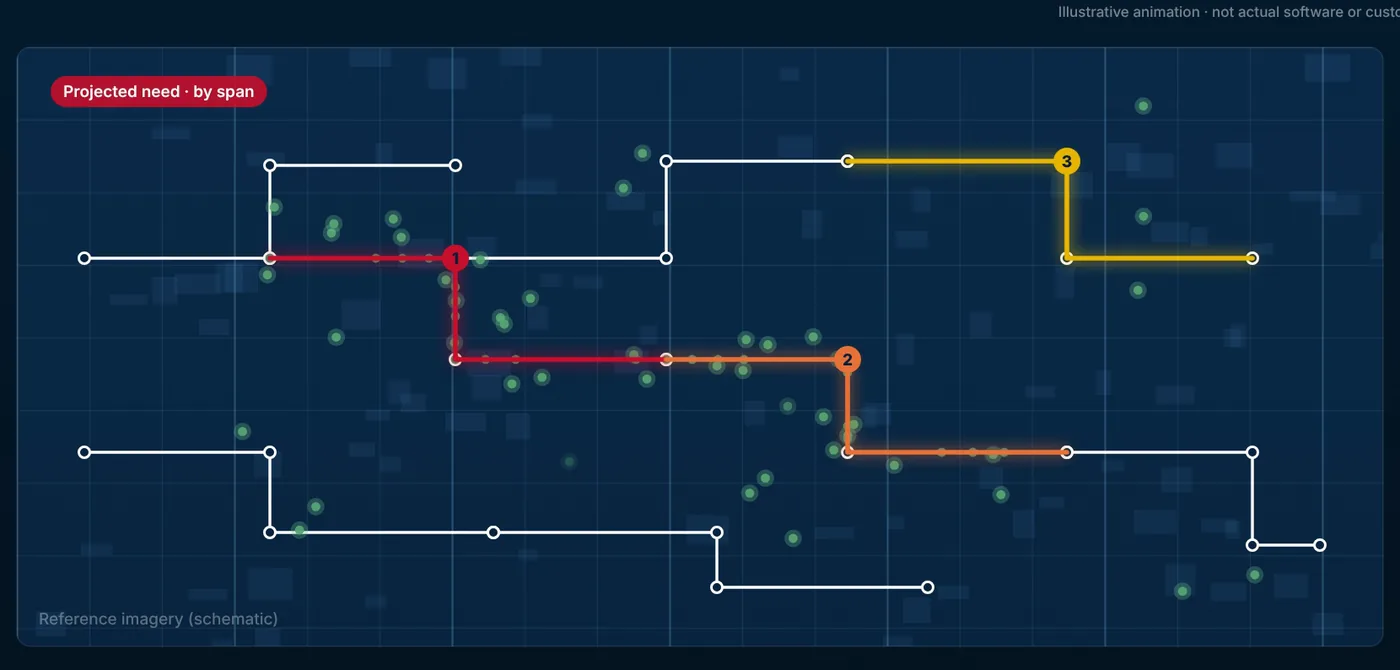
Leaf Monitor holds the collected trees — registered by species, with the growth behaviour and risk that go with each type — reads vegetation-caused outages, and correlates the two to project when each span needs attention. Planners set the cutting schedule from that projection, assign crews, and track the work to completion.
A crew registers a tree from the field, with its species and the growth behaviour that goes with it. Vegetation-caused outages are read separately, from a non-operational copy, using the cause coding you already apply. Put on the same map, the two stop being two reports and start being an order of work — which spans need attention, and which can wait.
Most utilities collect vegetation data tree by tree and store it apart from the network. The outages that vegetation causes sit somewhere else again, and have to be extracted and worked on outside any geographic environment before they can guide a plan. The result is a pruning cycle driven by calendar and territory rather than by evidence — crews sent to spans that were fine, and not sent to the ones that keep failing.
-
Collect where the crews already are
Trees registered with coordinates and photographs from a mobile application or a messaging channel such as Telegram or WhatsApp. The mobile application keeps working with no signal and synchronizes when the connection returns.
-
Record the species, not just the point
Tree records are held by species, with the growth behaviour and risk class that go with each type. Hazard trees are registered and tracked separately from clearance work.
-
Read the outages and correlate
Vegetation-caused outages are read from a non-operational source — a replica or data lake — identified by your own registered outage cause coding, then correlated against the collected trees.
-
Programme the schedule
The cutting schedule is set from the projection, by span, circuit or territory. Crews are managed by skill, certification and availability, with time and productivity recorded against the work.
-
Dispatch, verify, close
Orders are dispatched into the work-order system you already run, on a configurable cycle as crews become available. Post-work inspection is recorded against the span and completion verified before the routine closes, with cost tracked against budget.
The pruning cycle is driven by the calendar
Territory by territory, on rotation, whether or not those spans are the ones causing interruptions. Evidence changes the order of the work.
A crew spots a tree on another job
They register it with coordinates and a photograph from a phone, offline if there is no signal, and it is in the plan without anyone scheduling a survey.
Nobody can show the work was done
Post-work inspection is recorded against the span and completion verified before the routine closes, so the cycle has evidence behind it rather than a tick.
Leaf Monitor runs on its own, and gets better with the rest of the platform around it.
Gateway
Connects the network model, the ADMS source and the work-order system once, and keeps them available to every pod.
Spatial Studio
Shows vegetation alongside the electrical network, joint use and external layers, so a planner can see where the risks overlap.
Workspace
Consolidates the results into reports and indicators — vegetation-driven reliability, cost per circuit, crew productivity, cycle progress.
Assistant
Carries the work back into Smallworld, acting on the network model rather than only reporting on it.
Each connection is made by API or by a direct database connection, and is defined once rather than per project.
- ADMS
- Direction: Read only, from a non-operational source — a replica or data lake
- Your work-order system
- Direction: Read and write, by API — it is not replaced
- Mobile application and messaging channels
- Direction: Read — field collection, with offline capture
- The network model, through Gateway
- Direction: Read
- Spatial Studio and Workspace
- Direction: The combined layer view, and reports
| System | Direction |
|---|---|
| ADMS | Read only, from a non-operational source — a replica or data lake |
| Your work-order system | Read and write, by API — it is not replaced |
| Mobile application and messaging channels | Read — field collection, with offline capture |
| The network model, through Gateway | Read |
| Spatial Studio and Workspace | The combined layer view, and reports |
Where it stops
- Leaf Monitor is not an operational system. It reads vegetation-caused outages from a non-operational copy and takes no part in operating the network.
- It works from trees your own crews register. It does not analyse satellite or LiDAR imagery.
- Outages are identified by your own registered outage cause coding. Leaf Monitor reads that coding; it does not classify outage cause itself.
- It does not replace your work-order system. Pruning orders are dispatched into the one you already run.
- Reliability indicators and pruning cost per kilometre are what this work is accountable to — not figures Leaf Monitor is proven to move.
Who can see what
People sign in with the corporate directory account they already have, and what they are allowed to see is enforced in four places: at the platform, inside each pod, on the map, and in the answers that come back to them.
Where it stands
Technical walkthrough · 8 min
See it in action — watch the 8-minute Nexus AI Platform walkthrough.
Recorded directly in the platform, with English narration and no slide deck. GIS, ERP, ADMS, and maintenance answering together, without replacing the systems you already run. The link arrives after you register.
Need to brief your leadership? The one-page brief
A technical session covers your estate, where the platform would run, and which pods come first.
Book a technical session