
NEXUS AI / GATEWAY
Connect a system once. Every pod can use it.
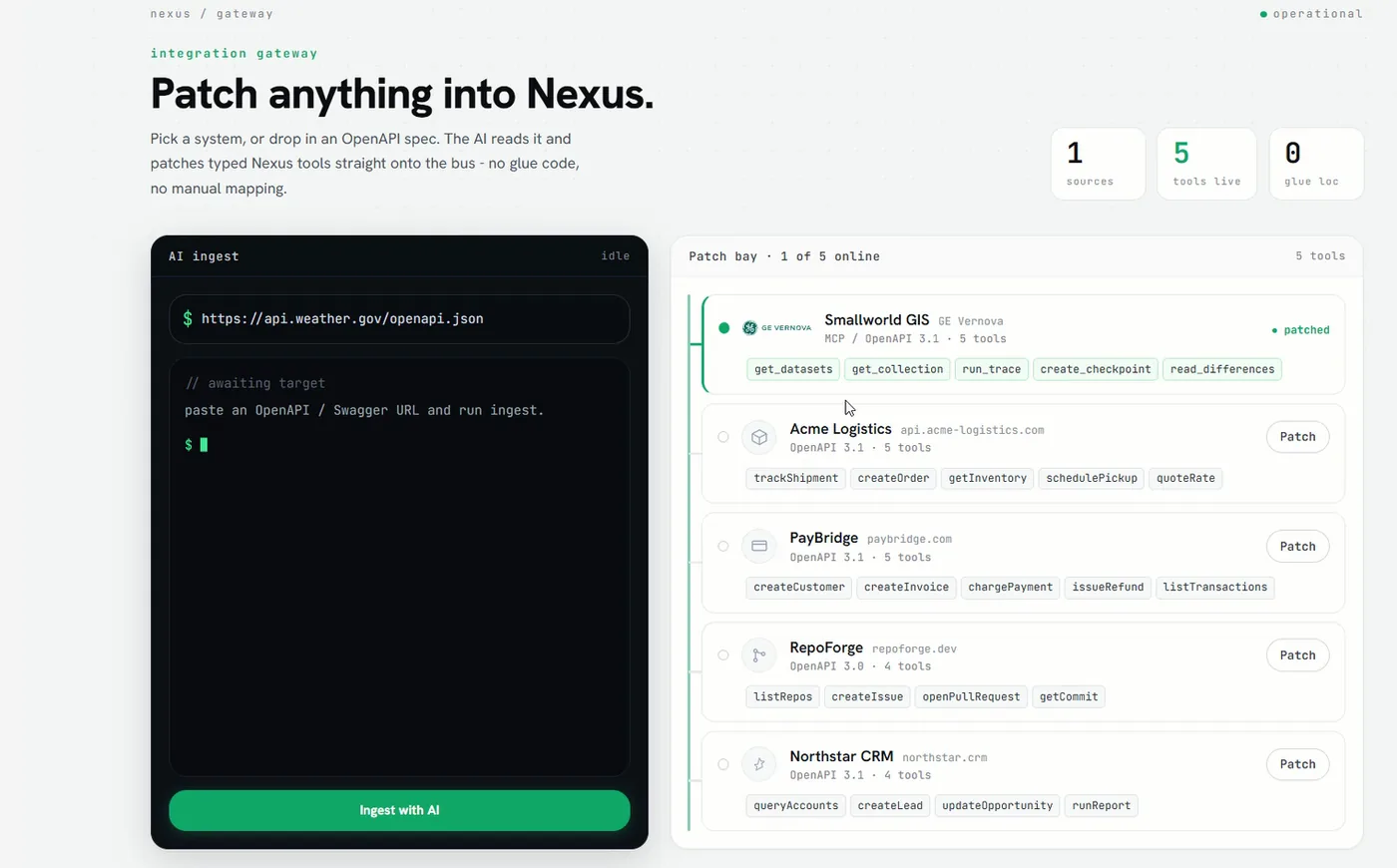
Gateway is the platform's connection hub. An administrator registers a third-party application and sets up the connection themselves, by API or by a direct database connection. From then on that application's information is available to every other pod — and the platform can push actions back out to it. You add Gateway when a pod has to reach a system outside the platform.
The traditional route is integration code — somebody writes it for each system, and somebody else maintains it. Here an administrator registers the system, runs it, tests it, and the tools it exposes are available to every pod. It does not need us in the room.
Every project starts with the same integration work. The GIS is joined to one system, the ERP to another, the maintenance system to a third, and the next requirement re-opens a connection somebody already built. The cost is not the first integration. It is the fourth time the same two systems are joined for a different reason, by a different team, with a different mapping.
-
Register the application
An administrator adds the third-party system and chooses how to reach it: its API, or a direct connection to its database.
-
Define the mappings
The fields that matter are mapped once, against that system's own structure, by someone who knows it.
-
Share it with every pod
From that point the application's information is available to Assistant, Workspace, Spatial Studio and the specialist pods, with no second integration to commission.
-
Push actions back out
The connection carries both directions. Pods read from the system, and — where you allow it — write back to it.
-
Repoint instead of rebuilding
When the system behind a connection changes version, the connection is repointed. Users keep the same interface and the same profiles.
A crew needs an asset record on site
A technician asks from the field. Gateway reaches the GIS and the maintenance system, and the answer comes back without a desktop client and without a call to the office.
SAP rates against Smallworld assets
Unit rates live in SAP and asset ages live in Smallworld. Gateway makes both available to the same question, so the reconciliation stops being a spreadsheet someone rebuilds every budget season.
A GIS upgrade is already underway
Thematic data can sit on the platform rather than in the GIS, so work starts without opening a change window. When the upgrade lands, the connection is repointed.
Each connection is made by API or by a direct database connection, and is defined once rather than per project.
- GE Smallworld
- Direction: Read and write
- Esri
- Direction: Read and write
- 3GIS
- Direction: Read and write
- SAP
- Direction: Read and write
- Maintenance systems
- Direction: Read and write
- ADMS
- Direction: Read only, from a non-operational copy
- Weather-forecast services
- Direction: Read
| System | Direction |
|---|---|
| GE Smallworld | Read and write |
| Esri | Read and write |
| 3GIS | Read and write |
| SAP | Read and write |
| Maintenance systems | Read and write |
| ADMS | Read only, from a non-operational copy |
| Weather-forecast services | Read |

Where it stops
- Gateway does not replace the systems it connects to. They remain the system of record.
- Nexus is not an ADMS. It reads from a non-operational copy and takes no part in operating the network.
- A connection needs the system's own access: credentials, network reach, and the person who owns that system in the room.
Who can see what
People sign in with the corporate directory account they already have, and what they are allowed to see is enforced in four places: at the platform, inside each pod, on the map, and in the answers that come back to them.
Where it stands
Gateway is not a prerequisite for anything. Pods run on what the platform already holds, and Gateway is what you add when one of them has to read from or write to a system outside it.
Technical walkthrough · 8 min
See it in action — watch the 8-minute Nexus AI Platform walkthrough.
Recorded directly in the platform, with English narration and no slide deck. GIS, ERP, ADMS, and maintenance answering together, without replacing the systems you already run. The link arrives after you register.
Need to brief your leadership? The one-page brief
A technical session covers your estate, where the platform would run, and which pods come first.
Book a technical session